QRZero
14.0250 MHz  CW  599

The logger that keeps up with the pileup.

QRZero is a fast, reliable logbook for DX chasers and CW operators. It talks to your radio, WSJT-X, N1MM+ and the cluster, watches your awards as you log, and sends your QSLs on their way.

Windows · macOS (Apple Silicon) · Linux · free · alpha
QRZero — N0CALL
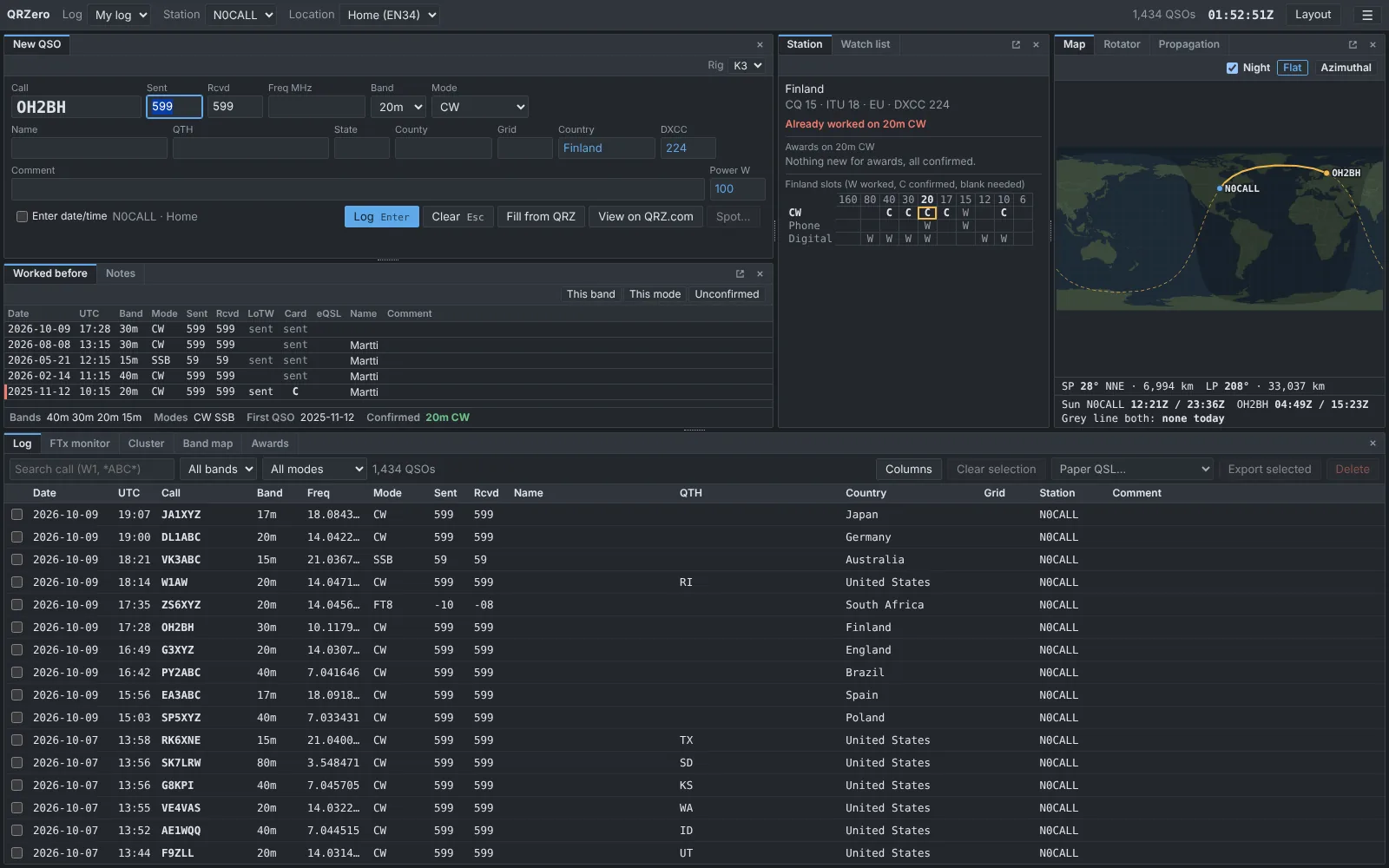
The QRZero main window: entry panel, worked-before list, station panel, map and log grid
The main window with a made-up demo log. Every pane can be moved, tabbed, resized or popped out to a second screen.

Why QRZeroBuilt for the way you operate

A logger should disappear while you work. QRZero keeps your whole log in one file, answers instantly, and stays out of your way.

Fast at any size

The log grid only loads the rows on screen and searches are indexed. Interactive queries are tested against a 200,000-QSO log, so nothing makes you wait mid-QSO.

Every mode is equal

CW, phone and digital get the same treatment: entry defaults, awards, band map and spot colours. Choose different entry layouts for each.

Nothing is lost

Every ADIF field of every QSO is stored, including ones other programs add, and comes back out on a full export. Daily automatic backups.

Local first

Your log lives on your computer. QRZero only goes online for services you switch on. Passwords go in the system keychain, never in the log file.

DX chaser friendly

A Needed now list with sound and popup alerts, split-aware spots, band-by-mode slot grids and new-one flags the moment you type a call.

Plain and classic

A dense desktop-logger layout. No account, no cloud, no wizard to fight. Light and dark themes.

200kQSOs tested under 100 ms per query
3platforms: Windows, macOS, Linux
1file holds your whole log
0accounts needed to start

FeaturesEverything in one shack program

A few of the things QRZero does. The how-to guide covers the rest.

Logging

Type the call. The rest fills itself.

Press Tab or Space and QRZero looks the call up and fills in name, QTH, grid, country and DXCC. Press Enter to log. Anything you type wins over a lookup.

  • Station pane shows what the contact is worth for each award
  • Worked-before list with duplicate markers and quick filters
  • Entry fields are yours: add, rename or give defaults to any ADIF field
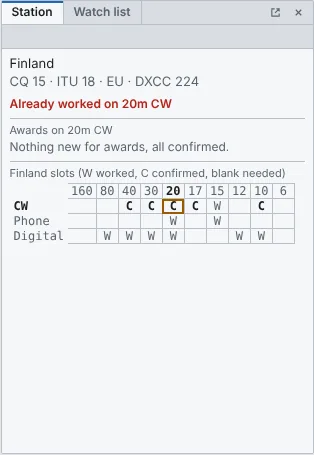
Station pane showing a new DXCC
Radio control

Your radio follows the log, and the log follows your radio.

Frequency, mode, split and PTT are read from the rig and can be set from the log. Clicking a spot or a decode tunes the radio, including split for UP 5 style spots.

  • Hamlib, TCI, Kenwood/Elecraft/Flex CAT, Yaesu and Icom CI-V
  • Several radios for SO2R and Flex slices
  • Rotator control with a compass dial and a map behind it
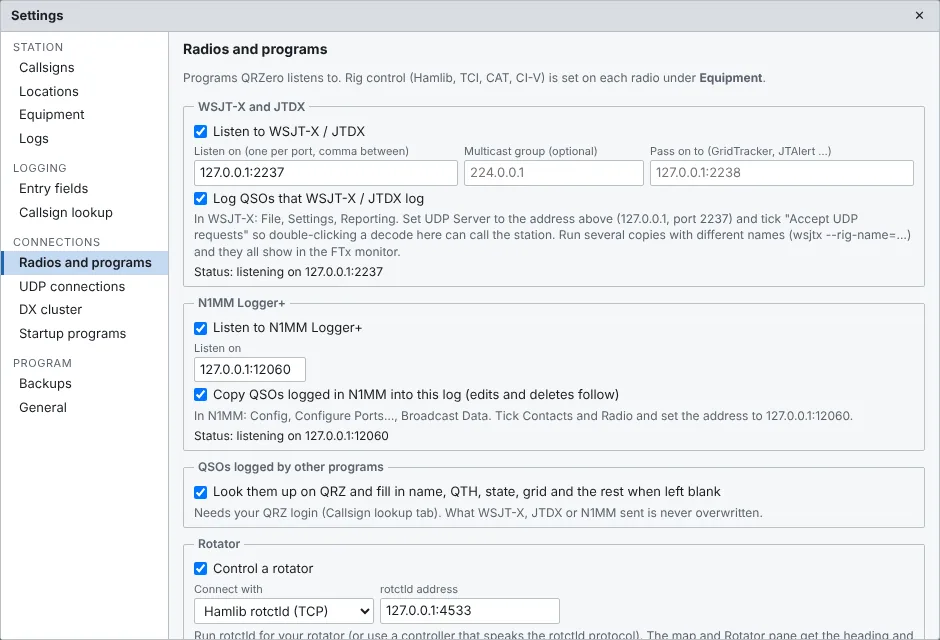
Radio settings
Digital

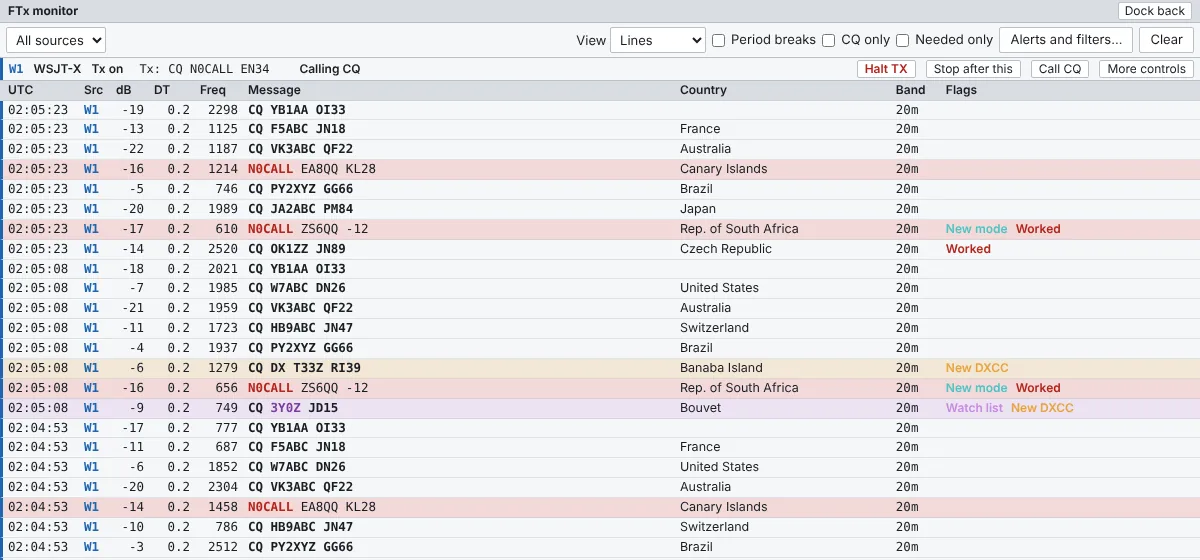
WSJT-X, JTDX and the FTx monitor.

Decodes from any number of WSJT-X or JTDX copies show up in one monitor, coloured by what you need. Stations calling you are pinned to the top.

  • Alerts for new DXCC, grid and band slots
  • QSOs logged by WSJT-X arrive in your log at once
  • N1MM+ contest QSOs flow in over UDP too
FTx monitor with decodes
DX cluster

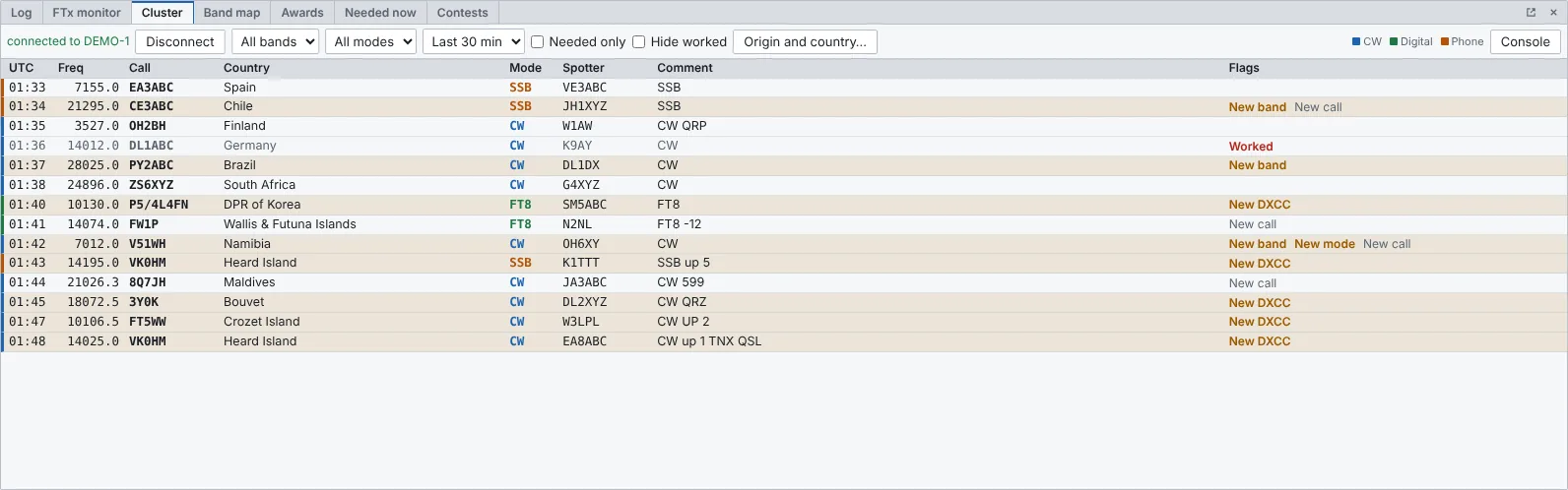
Spots, a band map and a watch list.

Connect to a cluster, filter what you see, and let QRZero flag the spots that would be new for you. The band map and watch list keep the interesting ones in front of you.

  • Click a spot to QSY the radio
  • Spot a station you just worked, with a preview of the exact line sent
  • DXpeditions and contest calendar panes
DX cluster pane
Awards

Watch your awards fill in as you log.

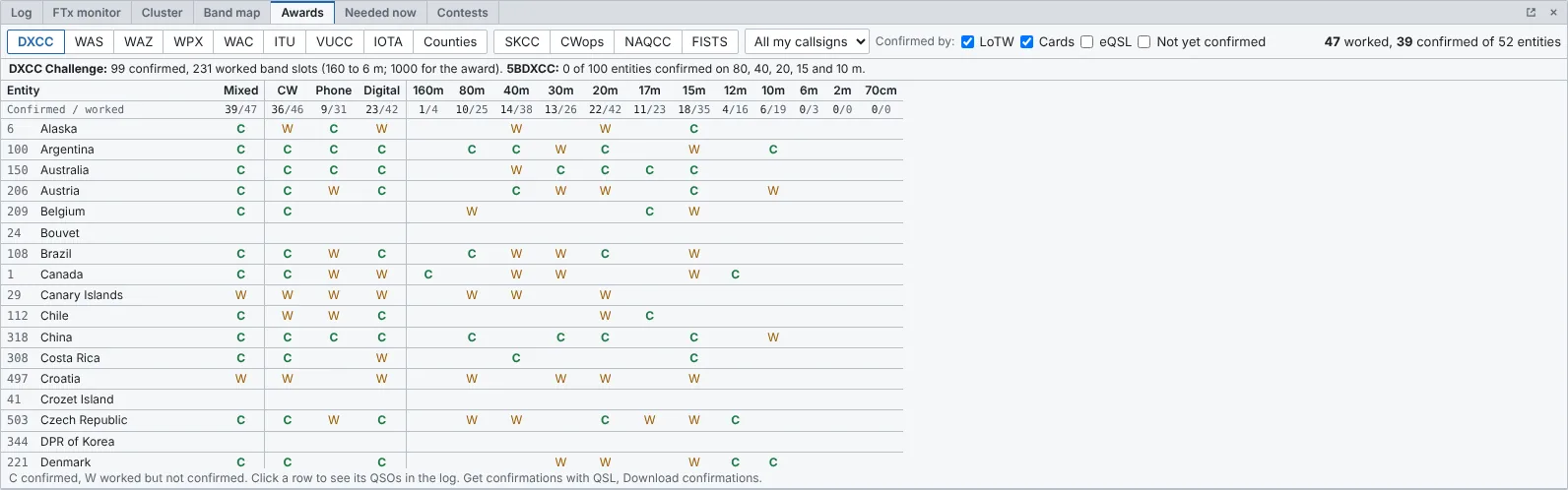
DXCC, WAS, WAZ and WPX, plus the CW club awards: SKCC, CWops, NAQCC and FISTS, with CWT medals. QRZero shows what is worked and what is confirmed.

  • Band-by-mode slot grids
  • Club numbers filled from your last QSO with the call
  • Hide the awards you do not chase
Awards pane
QSLs

LoTW, Club Log, QRZ.com, eQSL and paper in one window.

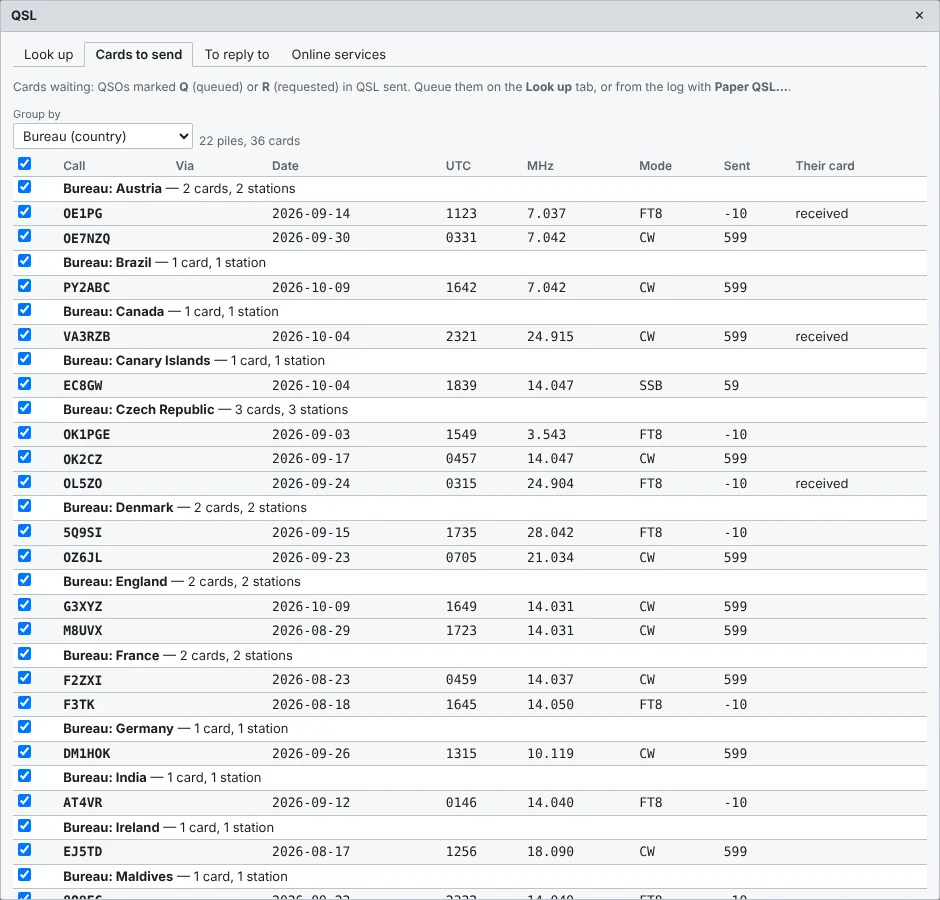
Uploads can run automatically a couple of minutes after you log, or in bulk by date range with a preview. Confirmations download back. Paper QSL has a queue and label printing.

  • Bulk paper QSL mailings and Brother QL label printing
  • LoTW station location override for portable operating
  • Per-service activity logs
Paper QSL manager

Plays well with others

WSJT-XJTDXN1MM Logger+HamlibTCIFlex / AetherSDRIcom CI-VYaesu CATPstRotatorAzDX clusterQRZ.comHamQTHLoTWClub LogeQSLADIF

StatusAlpha, and honest about it

QRZero is under active development and used on the air, but it is young. Windows gets the most testing. Export an ADIF backup now and then, and tell us when something is off.

Mac users: the Mac build is not signed with an Apple Developer account yet, so macOS shows a warning the first time. The Mac steps take about a minute.